

Help › Getting started
Invite your team and roles
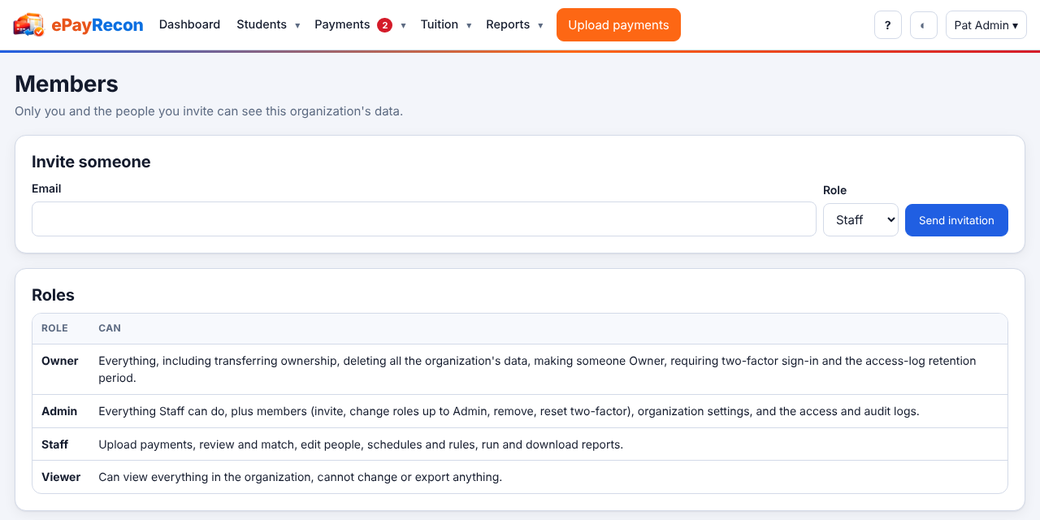
Invite the people who help with payments from Members (your name ▾ › Members). Each person gets their own sign-in and a role.
| Role | Can |
|---|---|
| Owner | Everything, including transferring ownership, deleting all the organization's data, making someone Owner, requiring two-factor sign-in and setting how long the access log is kept. |
| Admin | Everything Staff can do, plus members (invite, change roles up to Admin, remove, reset two-factor), organization settings, and the access and audit logs. |
| Staff | Upload payments, review and match, edit people, schedules and rules, run and download reports, email notices and statements, finalize. |
| Viewer | Can view everything in the organization, cannot change or export anything. |
Invite someone
- Open Members.
- Type their email, choose a role and press Send invitation.
- They get an email with a link that works once, for 7 days, for that address only. You can also copy the link shown on the page.
About the Viewer role. The site's export and download features (CSV, Excel, PDF, notices, statements) and every change are refused for Viewers on the server, and printing from the browser is turned off for them. Anything shown on a screen can still be photographed or copied by hand — the restriction covers ePayRecon's own features.
Still stuck? Contact us.