

Help › Bank payments
Column mapping and remembered layouts
After the upload you see the first rows and a menu above each column. At least a date, an amount (or a credit column) and a description or payer name are needed.
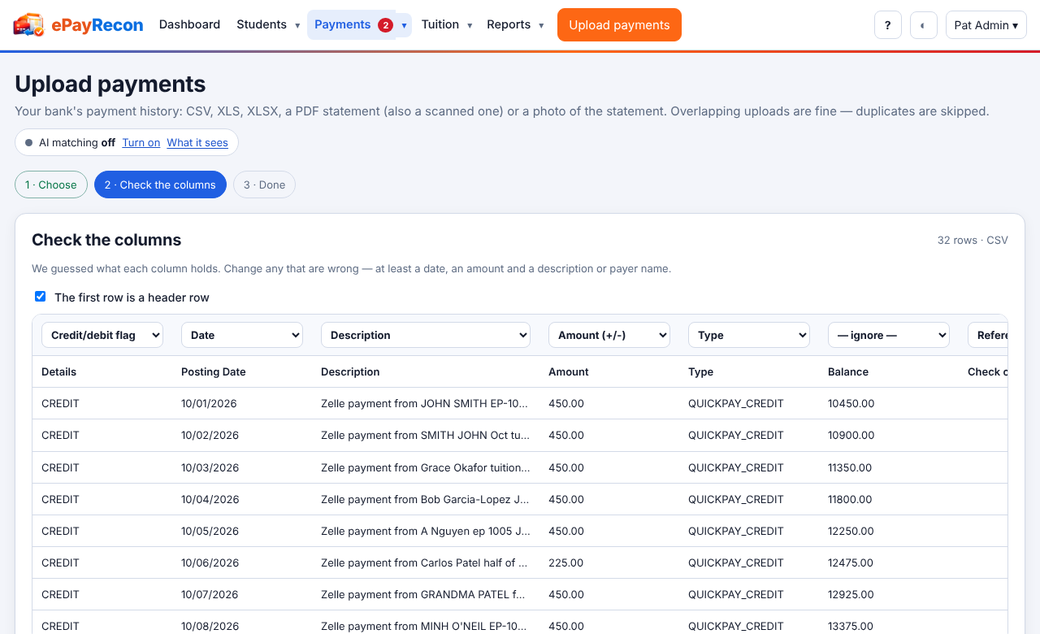
- Check what each column holds; change any that are wrong.
- Look at the preview of the payments below.
- Press Import.
When ePayRecon isn't sure what the columns hold and AI is on, it asks the AI and marks the result Suggested by AI for you to confirm (only the header and up to 5 sample rows are sent, without balances, account or phone numbers).
Once you confirm, the layout is remembered for your bank: the next file with the same columns is mapped at once, with no AI call.
Still stuck? Contact us.