

Help › Getting started
Create your organization
Everything in ePayRecon belongs to an organization: a school, a rental business, a club. You can belong to several and switch between them from your name in the top bar.
Sign up
- Go to Sign up and enter your name, email and a password (at least 10 characters, with a digit or symbol). You can also use Sign in with Google.
- Type your organization's name and choose its type (see Choose your organization type).
- Leave AI matching ticked unless you don't want it; you can turn it off at any time in Settings.
- Accept the terms and privacy policy and press Create account.
You arrive on the dashboard, with the next steps listed: import your list, set up what is due, tell payers their account numbers and upload your first bank file.
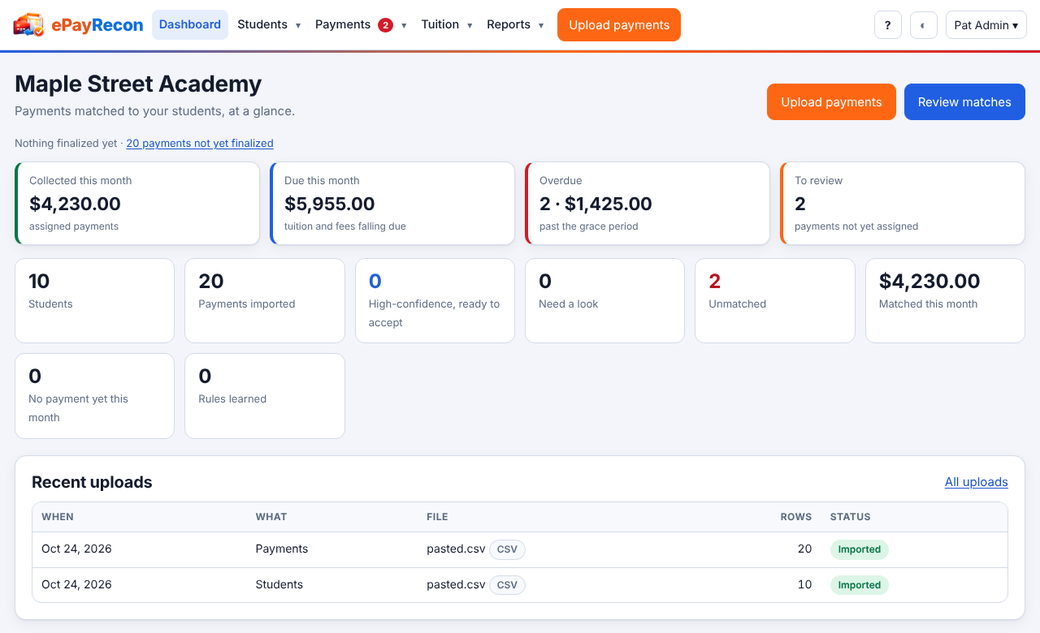
What the dashboard shows
- The key figures of your kind of organization (collected this month, delinquent, deposits held, pledges, and so on).
- How many payments are waiting for review, and how many are not yet finalized.
- Your latest uploads.
Nothing is shared between organizations. Every screen, and every database query behind it, is limited to the organization you are working in.
Still stuck? Contact us.